Find the words
Draft an email, soften a difficult message, rewrite a paragraph, or make your notes clearer.
“Make this sound friendly, but keep it short.”
 wittletby JE Horizon
Your desktop could use a little company.
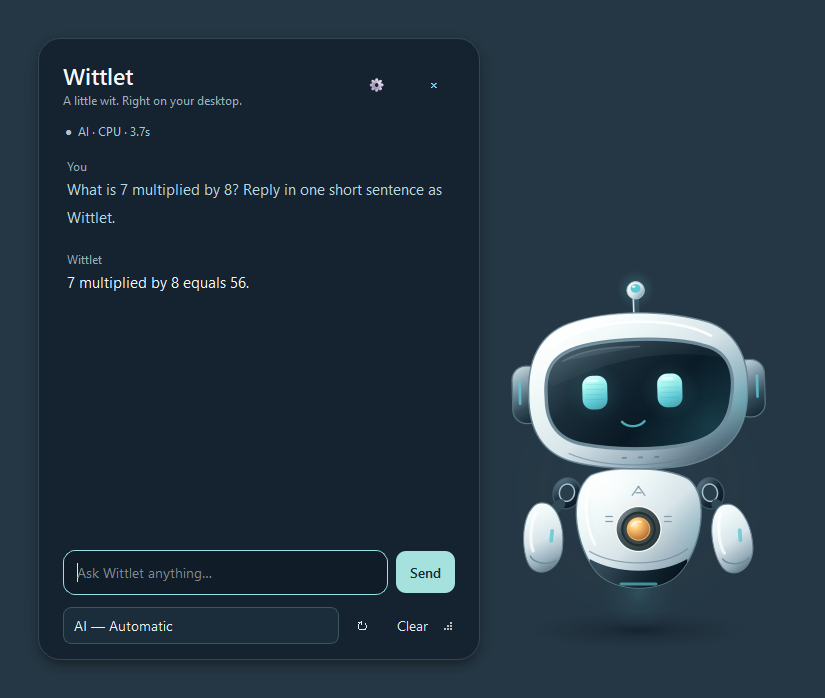
Meet Wittlet. A small, expressive Windows companion for thinking things through, finding the words, and working with files you choose—with your permission.
No cloud AI. No data center required. No API keys.
Local intelligence, running 100% on your machine.
Download the current Windows app from Microsoft Store. There is no Pro subscription.
Not another full-screen workspace. Wittlet lives beside the work you’re already doing. Click for a conversation. Tuck it into the tray when you want the space back.
Draft an email, soften a difficult message, rewrite a paragraph, or make your notes clearer.
“Make this sound friendly, but keep it short.”
Use Find files to search filename keywords in a folder you approve. Review the matching paths, then separately approve Open or Show in folder. Search works with filenames—not the meaning of document contents—and does not need AI.
“Find files named resume in the folder I choose.”
Read approved UTF-8 text or supported simple DOCX documents, review an edit, and explicitly approve saving it. Wittlet verifies a backup and checks for conflicting changes. Complex Word documents need a full document editor.
“Show me the proposed changes before saving.”
Orbit in Glacier
Explore character concepts and eight colorways on this page. Check the current Microsoft Store build for the choices and controls available in the app.
On your desktop: hold Ctrl and scroll to resize. Prefer less movement? Turn on reduced animation in Preferences.
Get Wittlet from Microsoft Store. After setup, default chat runs locally on your PC with no cloud AI API keys and is not a hosted chat service. Setup may need internet for models and updates.
The default setup uses ungated local models; independently chosen gated downloads may require your own authorization.
CPU-only chat is tested. Setup chooses one AI matched to your PC. Automatic processing can use compatible graphics, with CPU fallback; CPU-only is available in Preferences. Changing processing mode does not download another AI.
Wittlet can be wrong. Find, read, open and edit have separate scoped approvals: once for the selected action and target, or 168 hours for that action in the selected folder. You can revoke them. Creating a new file still requires review and an explicit Save. Wittlet does not browse the web, send emails or freely control other applications.
A Windows PC, a little breathing room, and an internet connection for setup.
Check the current Microsoft Store listing for supported Windows versions and hardware requirements.
| Your computer | Entry setup | Recommended |
|---|---|---|
| Windows | Windows 10/11, 64-bit x64 | Current Windows 11 updates |
| Processor | Modern x64 CPU with AVX2 | Ryzen 7 7700-class or comparable |
| Memory | 8 GB RAM; leave at least 4 GB available | 16 GB or more; leave 6 GB available for balanced AI |
| Storage | 15 GB free setup target, including a small AI and download headroom | SSD with room for setup, updates and your own files |
| Graphics | Not required for CPU chat | Compatible graphics may accelerate the selected AI; driver and runtime support required |
| Connection | Required to install dependencies and AI | Local chat can work offline after setup |
Open the current Wittlet listing and install the free app. No Pro subscription is required.
Launch the installed app from the Start menu and follow the setup shown in your version.
Use the controls visible in your installed version. For a walkthrough, open the Wittlet help guide.
Wittlet is free to download and play. There is no Pro subscription. You can earn Sparks in the app or optionally buy one-time Spark bundles for eligible unlocks.
Get Wittlet from Microsoft Store and meet your desktop companion. Check the current Store listing for the version and included features.
Get Wittlet free from Microsoft StoreFree to download and play. Optional one-time Spark bundles are separate.
Need setup or play help? Open the Wittlet guide.
Microsoft Store shows the current version, Windows requirements, updates, and any available purchases. Install and update Wittlet there.
Sparks can be earned in the app. One-time Spark bundles are optional.
No. CPU-only chat works without a dedicated graphics card. Setup picks one suitable AI based on available resources. Longer responses take more time and memory; compatible graphics acceleration is conditional, not guaranteed.
No. Recurring filename indexing needs a separate folder opt-in and remembers names and paths, not document contents. Re-indexing happens when you ask for it; nothing is scheduled behind your back.
Keeping Wittlet in the tray preserves the current in-memory conversation. Quitting completely clears it. Your appearance and processing preferences are saved separately.
No. Wittlet is free to download and play. You can earn Sparks in the app; optional one-time Spark bundles are separate purchases for eligible unlocks.
Yes. Use Windows Settings → Apps → Installed apps → Wittlet. Its installed app files and owned shortcuts are removed cleanly.